How to Write an Artist Bio for Instagram
Like it or not, you will need to be on social media to get your business momentum.
Here’s what you need to know about writing an effective, engaging and optimised artist bio on Instagram.
Things to include:
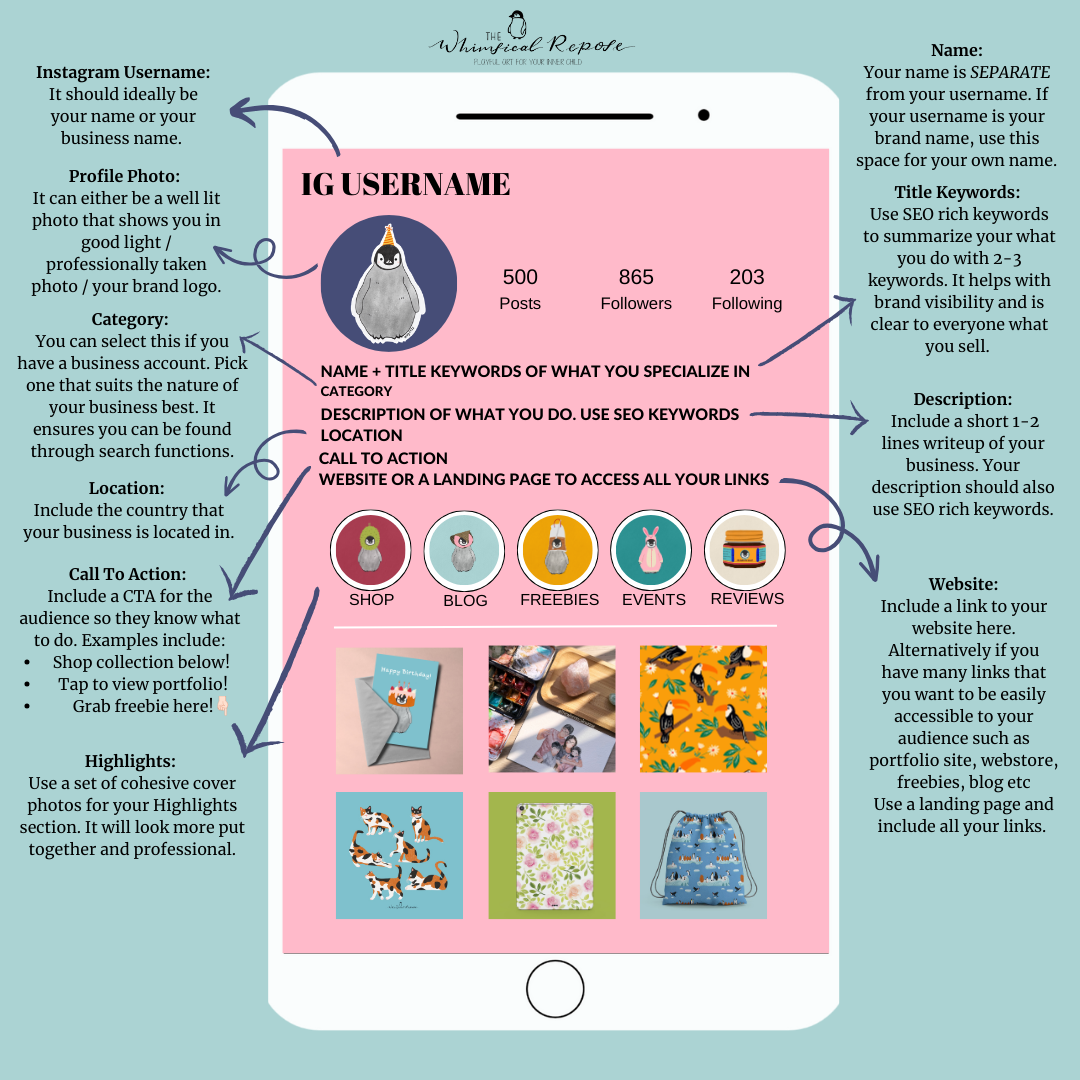
Profile photo - This should either feature your brand logo or a nice headshot of you.
Name - This is different from your username. Make sure to input keywords of what you / your brand does instead of wasting it on repeating your username.
Title Keywords - Choose a title that best represents your creative business
Description - Use this section to describe your brand/ what you do / goods & service you provide. Keep it short and sweet, and make sure you use SEO-rich keywords so that your profile can be optimised for discovery.
Location - Let people know where you’re from. A potential customer might want to know how geographically accessible your business is. You can just stick a flag emoji or use an abbreviated name for the country to get past the character limit.
Call to Action - Always include a CTA last before you insert your website. It is a reminder for your audience to interact with your brand. Be as clear and specific as you can. For example a simple “shop new designs below” will suffice if your business is product-based. You can always update the CTA whenever you need to, whether to promote a new blog post, shop the latest collection etc.
Website - Include a website, a blog, or one of those websites there they allow you to create a brand landing page with multiple links for different things. This is my preferred method.
Story Highlights - Create a brand-cohesive highlights cover page to make it look more polished. Use story highlights to organise important information such as price lists, FAQs, supplies etc. I have some FREE IG Highlight covers that I provide for my subscribers which you can access in the Penguin Cove (join my newsletter to gain access!).
Make use of the action buttons - Depending on your account, you have options to include buttons such as Book Now, Get Quote, View Shop, or Learn More. Use this function to encourage people to interact with your account. If you have a business account, you can add your contact details, your shop address etc as well. The point is to make it as easy as possible for a follower to see what your brand does and how to reach out to you.
Some tips for maintaining your Instagram bio_
1. Update it regularly so that your audience is always getting the most accurate information about your business. For example, you can include details about events, new launches etc
2. Change up your CTA once in a while to keep it interesting and to let your audience know about your offerings such as a new blog post or a new freebie to download.
3. Track your stats. If you feel that something isn’t working for you, don’t be afraid to conduct an overhaul for a fresh look.
I hope this helps you to get your social media presence started.
Need some other help in getting started? Check out the other blog posts.